
Within each company, there is a variety of training needs that apply to workers in individual roles. Training can be based on industry, craft, and federal, state, or local training requirements.
The example we will use in this case are training topic requirements for General Industry (29CFR1910)– for a basic manufacturing employee, such as:
- New Employee Basic Safety Orientation
- Lock Out / Tag Out
- Hazard Communication Training with GHS Annual Training
- Forklift Driver Safety Training
- OSHA 10 Hour General Industry Training
- HAZWOPER 8 Hour First Responder Awareness Training
- Walking Working Surfaces Industry Update
- …
While some training is a one-time event, othe topics are required every one, two, or three years. With employees starting on different dates, workforce turn-over, and promotions within the company the challenge arises to keep track of who received training and when. The daily training question is:
Which worker will need to be trained to stay compliant with workforce safety regulations?
SafetyScheduler closes this gap, by using information like:
- What training does each position/job title require (mandatory and optional)?
- What are the frequency of each training topic by location and regulatory requirement?
- What are the safety topics required for each job title or incident?
- How many classes and when did the employee last attend a training required for his/her role?
By bringing various data elements together, your company receives a holistic view of the safety training landscape within your organization. SafetyScheduler provides training requirement information on an employee level or company level.
Training Needs are identified with one click
Example for employee level:
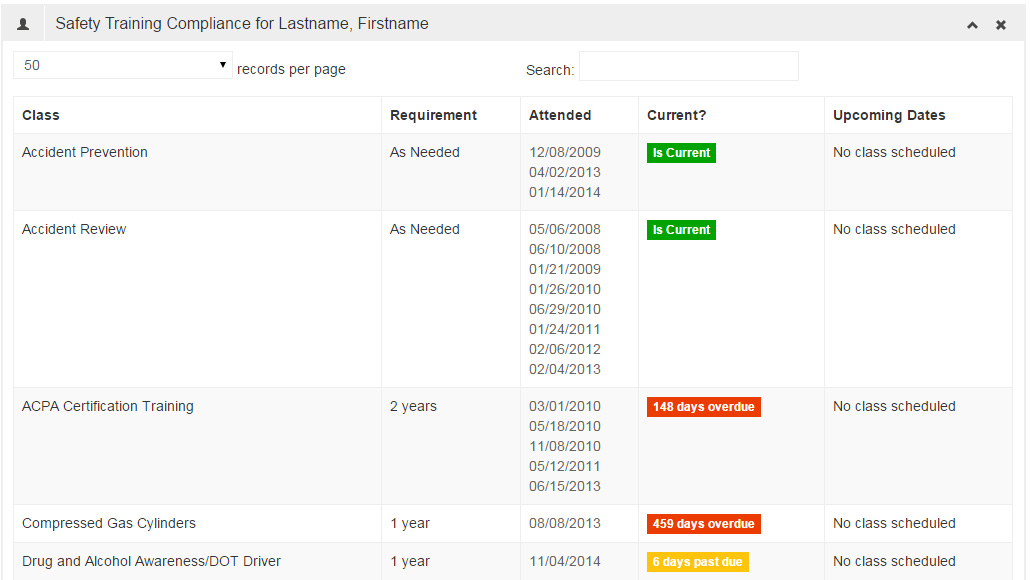 This is part of the employee detail view for each training topic:
- if training is required for the worker and if so at what frequency,
- recent dates the training was attended by the worker,
- visual check if the training for this topic is current using color codes,
- upcoming class dates to add the worker to this training if needed
Example for company level:
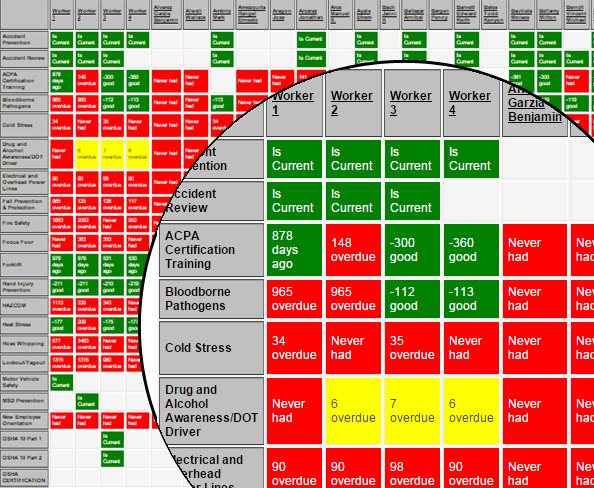 The company training heatmap lists all training topics that are available for the company against all employees.
- White: the employee (X-axis) is not required to attend this training (Y-axis)
- Green: the employee is required to attend this training topic and the training is still current. For example, if the training has to be taken every year and the training session was held on July 1st, 2017, this field will be green until June 15th, 2017
Green also shows if an employee attended a training that was optional. - Yellow: the employee attended training that was required for this position, but the training is about to lapse. For example, if the training has to be taken every year and the training session was held on July 1st, 2016, June 16th, 2017 this field will show yellow as the training has to be renewed within 2 weeks or less. Yellow also indicates is training is overdue up to 14 days.
- Red: the employee is required to attend this training topic, but has not had the training. Red can also indicate that the training was provided, but has lapsed. For example, if the training has to be taken every year and the training session was held on July 1st, 2016; starting July 1st, 2016 this field will red.
- Why it matters:
- Rows with lots of red indicate that this training topic is needed by many employees. This training should be scheduled ASAP.
- Columns with lots of red indicate workers that are lacking safety training. This employee should be scheduled for training as he/she is a potential liability for the company.
- As a safety manager, print out the heat map the first time you generate it. Every month, print it again to highlight your impact on the safety within the company. Use the heat map to track KPIs.